Surikata
BigHub desktop app for tracking work activity, meetings, and time entries.
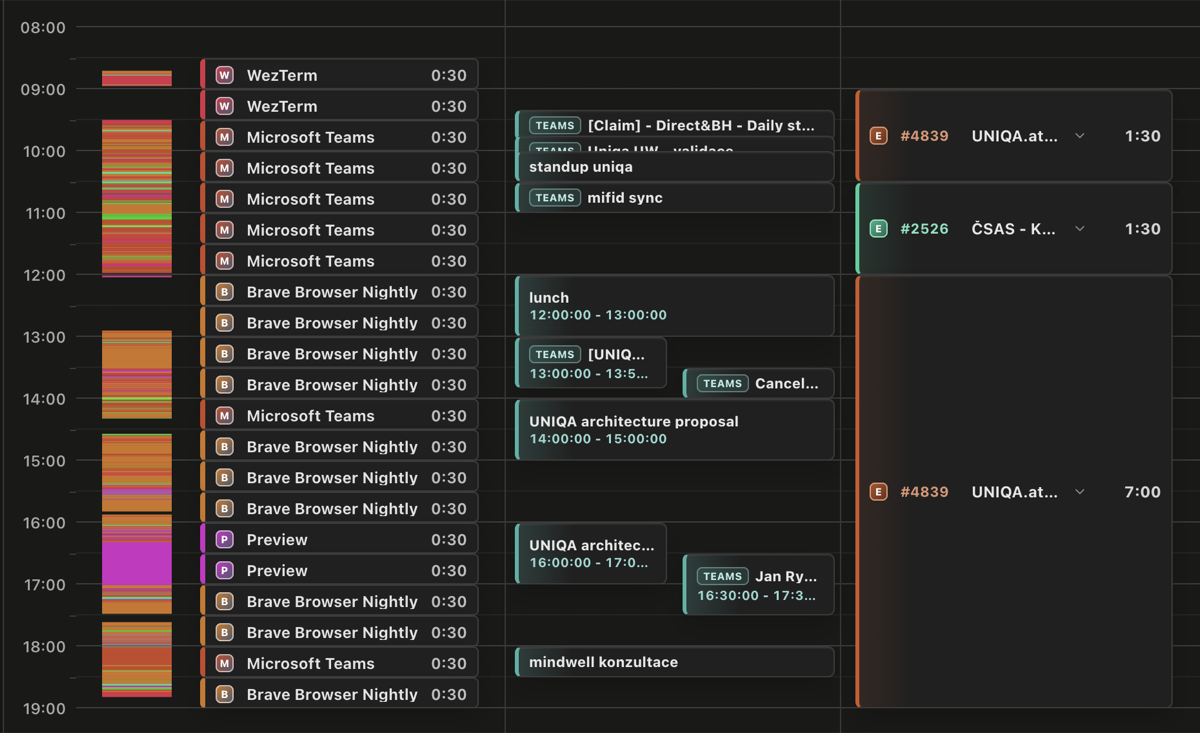
Surikata is BigHub's macOS desktop app for tracking work activity and turning it into accurate EasyProject time entries. It builds a private timeline of the applications and windows used during the day, combines it with Outlook meetings, and helps you see what you worked on without reconstructing the day from memory.
What Surikata does
Surikata:
- records work activity in a day and week timeline;
- syncs EasyProject tasks and uses them when clocking hours;
- adds Outlook calendar events to the timeline;
- optionally records meetings and transcribes them;
- keeps activity history, settings, and recordings in a local SQLite database; and
- checks for new versions and lets you install updates from the app.
Download
Choose the installer for your Mac:
The installers are signed and notarized macOS applications hosted in the Surikata Azure Storage account. After installation, Surikata checks the same storage account for updates.
Initial setup
The setup wizard must be completed before the main application opens:
- Enter your EasyProject API key. Surikata uses it to load your account and tasks.
- Paste your Outlook calendar's published ICS URL so meetings can appear in the timeline.
- Grant Accessibility, Screen Recording, and Microphone permissions when macOS asks for them.
Accessibility and Screen Recording let Surikata identify the active application and window title. Microphone access is used only by the optional meeting recording feature.
Daily use
Leave Surikata running while you work. Open the timeline to review which applications and windows were active, compare that activity with calendar meetings, and select the appropriate EasyProject task when recording time. The week view gives you a broader overview when completing time entries for several days.
Outlook calendar sync
Surikata reads the configured ICS calendar feed and places meetings alongside tracked work. This makes focused work, calls, and gaps in the day easier to identify.
EasyProject sync
Surikata loads your EasyProject tasks and uses them to clock hours based on the work shown in the timeline. The API key and resolved EasyProject user are stored in the local application database.
Meeting recording and transcription
Meeting recording is optional and can be turned off in Settings. Recordings stay on the Mac. Transcription is also optional; when enabled, audio is sent to the configured Azure Speech service to produce the transcript.
Privacy
Tracked activity, settings, and recordings are saved locally and are not uploaded by Surikata. Network requests are made only for features that need their configured external service:
- EasyProject task synchronization and time entries;
- the Outlook ICS calendar feed;
- optional Azure Speech transcription; and
- application update checks and downloads from Azure Storage.